Fewer Tracking Deployments
Change event payloads in Magento Admin instead of opening development tickets for every new marketing parameter or analytics requirement.

ANALYTICS · GTM & GA4
Data Layer for Magento 2 & Mage-OS gives agencies full control over GTM and GA4 tracking through admin-editable JSON event templates, cache-safe ecommerce events, Consent Mode v2 and server-side transmission to GA4, Meta, TikTok and GTM Server-Side — without requiring a deployment every time the tracking schema changes.
Product details
Magento 2 & Mage-OS GTM / GA4 Data Layer Extension
qoliber Data Layer gives Magento agencies, analytics teams and merchants control over GTM and GA4 tracking without hard-coding every event into templates or JavaScript.
Every tracking event is rendered from an admin-editable JSON template. Add a campaign parameter, rename a key, change an ecommerce payload or create a store-specific variation directly from Magento Admin — without waiting for a developer, release window or deployment.
The same event can also be transmitted server-side to supported analytics and advertising destinations, reducing the conversion data lost to browser restrictions while keeping consent, deduplication and attribution logic under control inside Magento.
Stores → Configuration → qoliber → Data Layer → Templates → purchase
{
  "event": "purchase",
  "event_id": "{{event.id}}",
  "@djson if order.coupon": {
    "coupon": "{{order.coupon}}"
  },
  "ecommerce": {
    "transaction_id": "{{order.id}}",
    "currency": "https://qoliber.com/",
    "value": "{{order.revenue}}",
    "items": {
      "@djson for order.items as item": {
        "item_id": "{{item.sku}}",
        "price": "{{item.price}}",
        "quantity": "{{item.qty}}"
      }
    }
  }
}
↓ renders to
window.dataLayer — and the corresponding server-side event
{
  "event": "purchase",
  "event_id": "ord-000000148",
  "ecommerce": {
    "transaction_id": "000000148",
    "currency": "EUR",
    "value": 249.00,
    "items": [
      {
        "item_id": "MS-04-XL",
        "price": 83.00,
        "quantity": 3
      }
    ]
  }
}
The important field is event_id. Purchase identifiers are deterministic rather than randomly generated, allowing platforms that support browser/server deduplication to recognise both transmissions as the same conversion.
Tracking changes should not automatically become development projects. Data Layer separates the event structure from the storefront implementation, helping agencies reduce small analytics tickets while keeping the tracking architecture predictable and auditable.
Change event payloads in Magento Admin instead of opening development tickets for every new marketing parameter or analytics requirement.
Server-side transmission gives supported destinations another path for events that browser-only tracking may fail to deliver.
Shopper-specific events use Magento private customer-data rather than being embedded inside shared cached HTML.
Validate payloads, inspect dispatched events and see responses instead of treating the analytics platform as a black box.
Pushing a standard ecommerce event is easy. The difficult part is maintaining correct tracking behind Magento full-page cache, handling changing marketing requirements, respecting consent and knowing whether the event actually arrived.
Without it: ticket → developer → release window.
Events are editable templates in Magento Admin, with separate configuration per event and store view. Change the JSON structure and save — no phtml edit or deployment required.
Without the right architecture: shopper-specific data can end up in shared output.
Cart, wishlist and login events travel through Magento's private customer-data section, keeping them shopper-specific and outside cached HTML.
Without it: a conversion can simply disappear from the destination.
Supported events can also be queued and transmitted server-to-server from Magento, providing a second delivery route that does not depend on the browser pixel.
Without deduplication: reported revenue becomes unreliable.
Purchase events use a deterministic identifier derived from the order. Supported advertising platforms can therefore recognise corresponding browser and server events as the same conversion.
Stopping future capture is not always enough.
Consent is checked on subsequent page views, and captured advertising identifiers are removed after relevant consent is withdrawn rather than simply remaining until their normal expiry.
An HTTP success response does not necessarily mean valid analytics data.
The GA4 validation CLI sends a real rendered payload to Google's validation endpoint and returns the platform validation messages to the developer.
The event list is not the difficult part. The engineering value is in making tracking cache-safe, configurable, observable, consent-aware and recoverable when production conditions are less predictable than a demo store.
Most established Magento analytics extensions cover the standard GA4 ecommerce events. The bigger differences appear when you need to modify the schema, maintain tracking behind full-page cache or move part of the data flow server-side.
| Capability | qoliber | Competing modules |
|---|---|---|
| Changing event structure | Admin-editable JSON templates per event, per store view | Commonly code or configuration-driven |
| Shopper events behind FPC | Magento private customer-data shopper-specific, outside cached HTML | Implementation varies |
| Browser tracking blocked | Four server-side destinations GA4 MP, Meta CAPI, TikTok and GTM Server-Side | Often browser-side; server support varies |
| Browser/server deduplication | Deterministic event ID same conversion identifier where supported | Not commonly documented |
| Consent Mode v2 | Denied by default same consent state gates server-side transmission | Implementation varies |
| Paid-click attribution on cached pages | Browser capture, first touch wins identifiers persisted onto order | Not commonly documented |
| Consent withdrawal | Stored identifiers removed | Varies |
| Payload validation | CLI validation + dispatch log | Often not publicly documented |
| Destination outage | Queue-backed dispatch with retries checkout does not wait on analytics destinations | Architecture varies |
| Published automated testing | 699 unit · 54 integration · 53 E2E | Usually not published |
“Typical Magento GTM Extension” is a general description of commonly published capabilities in Magento GTM and GA4 products reviewed in August 2026. Capabilities differ between vendors. “Not commonly documented” does not mean that no competing implementation provides the capability.
You can keep your existing GTM container. Data Layer ships with standard GA4 event structures and lets your team reshape individual payloads from Magento Admin to match the tags and triggers already implemented in your container.
Once analytics affects budget allocation, bidding and revenue reporting, tracking reliability becomes infrastructure rather than a frontend convenience.
Supported events can be transmitted directly from Magento to GA4 Measurement Protocol, Meta Conversions API, TikTok Events API and a GTM server-side container.
Transmission runs through a message queue. An unavailable advertising platform therefore does not block checkout, and failed attempts can be retried and inspected.
Purchase events use an identifier derived from the order rather than a random value. This provides a stable key for platforms such as Meta and TikTok to match browser and server events representing the same conversion.
Important: GA4 Measurement Protocol does not automatically deduplicate an event against an equivalent gtag browser event. The GA4 server-side destination should therefore be used intentionally rather than as an automatic duplicate of existing browser tracking.
Consent Mode v2 defaults are set to denied before the container loads. The resulting state also controls applicable server-side transmission instead of protecting only the browser channel.
The implementation can work with a CMP as well as Magento's native cookie restriction mechanism, giving agencies more flexibility across existing project setups.
Advertising click identifiers including gclid, gbraid, wbraid, fbclid, msclkid and ttclid, together with UTM parameters, are captured in the browser.
First touch wins, and attribution data is copied onto the order when it is placed. This allows campaign information to survive Magento full-page cache and remain available after checkout.
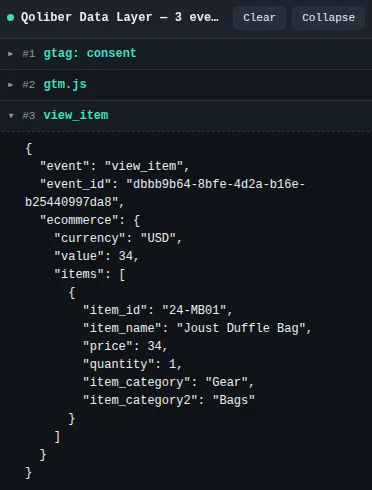
Enable a storefront debugging panel on staging to inspect each dataLayer push and the exact JSON received by your GTM container.
Test destination credentials, validate real GA4 payloads and render templates directly from the command line.
The dispatch log records destination, status, response and skip reason for server-side attempts with configurable retention.
Magento Open Source and Adobe Commerce 2.4.7+, plus Mage-OS.
8.1 – 8.5, tested across the supported range.
DJson templates: editable JSON structures owned by your project.
GA4 Measurement Protocol, Meta CAPI, TikTok Events API and GTM Server-Side.
The automated suite covers PHP 8.1–8.5 and includes tests that drive an actual storefront and verify what reaches window.dataLayer, alongside Magento coding standards and PHPMD checks.
No. Each event is an editable JSON template in Magento Admin, configurable per store view and previewable before saving. Adding fields or changing payload structure does not require a storefront deployment.
Yes. The extension ships with 14 preconfigured GA4 ecommerce events and pushes rendered payloads to the Magento storefront data layer for GTM usage. Server-side destinations include GA4 Measurement Protocol as well as supported advertising APIs.
Meta and TikTok can use the deterministic event identifier shared by corresponding browser and server purchase events for deduplication. GA4 Measurement Protocol does not automatically deduplicate against gtag, so the GA4 server-side destination should be configured intentionally rather than used as an automatic duplicate.
Yes. Page-level events can remain cacheable, while shopper-specific events such as cart, wishlist and login are delivered using Magento private customer-data rather than shared cached HTML.
Yes. Consent defaults are denied before the container loads, and applicable consent state is also used to gate server-side transmission. The extension can read consent from a CMP and Magento's native cookie notice.
Yes. The GA4 validation command submits the rendered payload to Google's validation endpoint and returns the validation messages, while the dispatch log records server-side transmission attempts.
Server-side transmissions run through a message queue, so the storefront and checkout do not wait for the external destination. Failed attempts can be retried and remain visible in the dispatch log.
Yes. The supplied engineering figures include 699 unit tests, 54 Magento integration tests and 53 end-to-end browser journeys, together with PHPStan level 8, Magento coding standards and PHPMD checks.
WHAT IT FIXES
Hard-coded tracking turns every new marketing parameter into a ticket, a developer and a release window. qoliber Data Layer renders each event from a JSON template editable in Magento Admin per store view, and can send the same event server-side to GA4, Meta, TikTok and GTM Server-Side.
INSTALL · COMPOSER
Your license adds the package to your private qoliber repository. Add the repository once, then require the package like any other dependency — no ZIP files, no copying folders into app/code.
# Once per project: add your private qoliber repository
# (the exact command is in your account → Composer & keys)
composer require qoliber/data-layer
php bin/magento setup:upgrade
✓ Installed. Updates arrive with composer update.