
CATALOG · CUSTOM OPTIONS
Advanced Product Options.
Ask only what applies.
- Who it helps
- Stores selling personalized or configurable products through custom options.
- What changes
- Options become swatches, conditional questions, per-character prices and values with their own stock.
- Swatches, buttons, grids, date, color and range inputs
- Option and value rules; hidden required options never block
- Per unit, cart line, character or entered quantity, setup fees
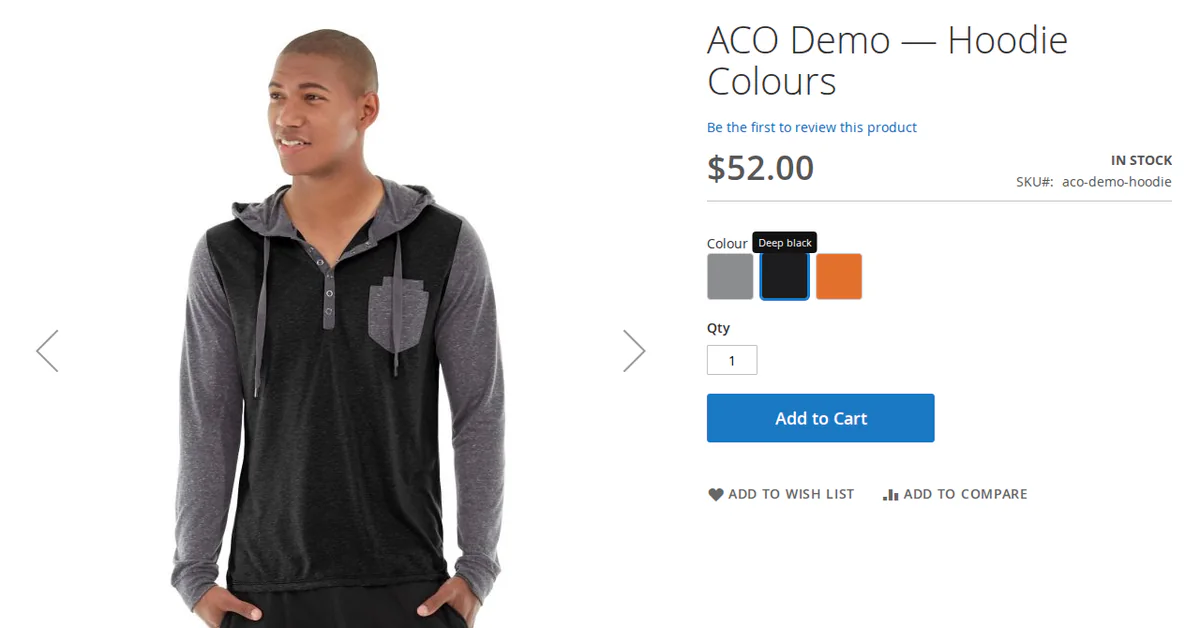
Turn Magento custom options into swatches, conditional questions, per-character prices and values with their own stock, so shoppers order what they meant.
8.1–8.5
PHP
Compatible
Magento Open Source
Compatible
Mage-OS
Compatible
Hyvä
v 1.1.0 — RELEASED 1 month ago
composer require qoliber/advanced-options-suite
Product details
Custom options that ask the right question and charge the right price.
Magento's custom options already hold the answer to "what exactly do you want?", but they ask it with long lists and a form that shows every field to everyone. Shoppers pick the wrong thing, sold-out choices turn into refunds, and one-off charges end up multiplied by quantity.
Advanced Product Options turns those same options into swatches, questions that appear only when they apply, add-ons priced by the character or by the unit, and values that carry their own stock. The price the shopper sees is the price they pay.
Who it is for
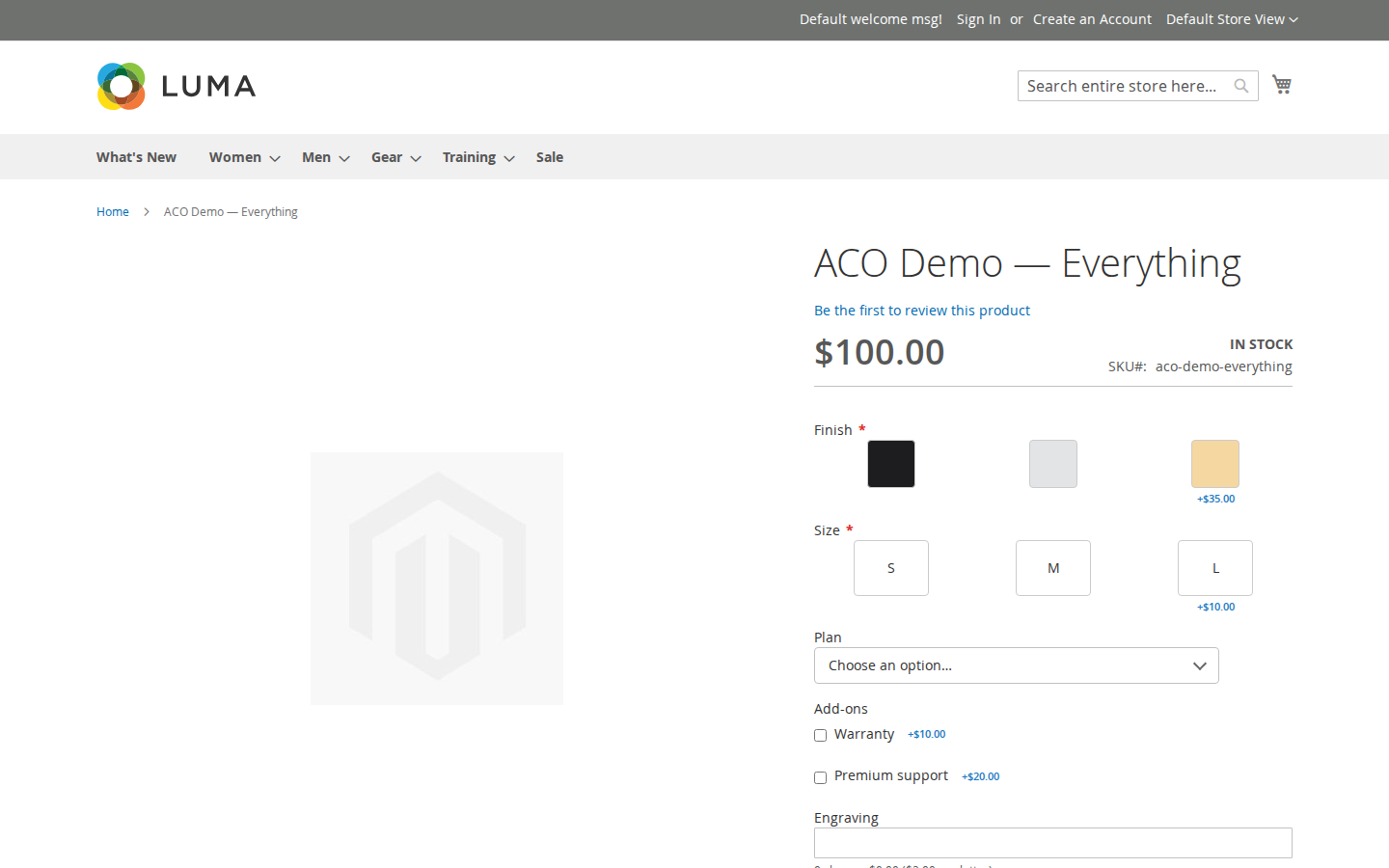
- Stores that sell personalized products. Engraving and gift messages can be priced by their length, and a character limit stops the shopper at the limit instead of failing at checkout.
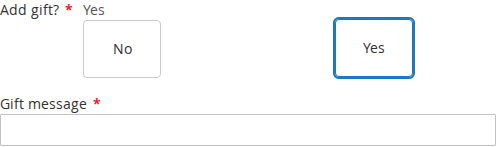
- Stores with configurations that branch. A brand choice can narrow the model list to that brand's models, and a question that does not apply stays hidden.
- Stores whose option choices are real stock. Each value can hold its own quantity, or be backed by a real product whose stock and SKU travel onto the order.
- Luma, Hyvä and headless storefronts. Option data is published on Magento's own GraphQL product query.
How you set it up
- Build the option. On the product's Customizable Options, pick a renderer: color, image or text swatches, buttons, styled dropdowns, multi-checkbox add-ons, grids, or date, time, color and range inputs.
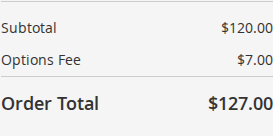
- Set the price. Per unit, per cart line, absolute, per character, per entered quantity, or a setup fee. A per-cart-line charge appears as its own taxed Options Fee row.
- Add conditions. Make an option or a value appear only after another answer. A hidden required option never blocks the cart.
- Track stock if it matters. A sold-out value is shown disabled with your message and refused at add-to-cart and at checkout. Stock comes back when an order is canceled, or refunded with Return to Stock.
- Reuse it. Option templates apply one option set to many products, and a live link carries later edits to all of them.
Also included
- Linked products: a value can be a real product that joins the order at zero under its parent and draws down its own stock.
- Order SKUs your warehouse can pick against.
- Per-value cost and weight that follow the choice onto the order item.
- Value images: choosing a value swaps the product photo and shows the value's description.
Requirements
| PHP | 8.1 to 8.5 |
|---|---|
| Platform | Magento Open Source or Mage-OS with magento/framework 103.0.0 or later and magento/module-catalog 104.0.0 or later |
| Hyvä (optional) | qoliber/advanced-options-hyva, which needs the Hyvä theme module 1.1.20 or later and works on Hyvä CSP storefronts |
Limitations
- On Luma, value images swap only to images already in the product gallery. "Add to gallery" does not add an image, and "Tooltip only" is not rendered yet.
- Content Staging is not part of the 1.x suite.
- Hyvä storefronts need the Hyvä package. The base modules render for Luma.
FAQ
Do I have to rebuild my existing custom options?
The suite works on Magento's custom options, so you add renderers, prices and rules on the product's Customizable Options. Each value is edited in one Advanced options dialog.
Can a hidden required option block the sale?
No. A required option that is hidden by a condition never blocks the cart.
How does a one-off fee appear on the order?
Setup fees are billed once per cart line whatever the quantity. They appear as their own taxed Options Fee row on the cart, checkout, invoices, credit memos and PDFs.
Is the price the same across channels?
Yes. The price is the same on the product page and in the cart, in the shopper's display currency, and on GraphQL, REST and admin orders.
Does it call a third-party service?
No. Pricing, stock checks and rule evaluation run inside Magento.
WHAT IT FIXES
Custom options that look like choices.
Long native lists make shoppers read instead of choose, and every field shows to everyone. Advanced Product Options keeps Magento's custom options and adds renderers, conditions, pricing rules and stock per value.
- Swatches, buttons, grids, date, color and range inputs ● renderers
- Option and value rules; hidden required options never block ● conditions
- Per unit, cart line, character or entered quantity, setup fees ● pricing
- Stock per value, refused at add-to-cart and checkout ● stock
- Values backed by real products and order SKUs ● fulfillment
- Templates with a live link to many products ● reuse
INSTALL · COMPOSER
One suite package.
The metapackage installs the ten base modules. Hyvä storefronts add the Hyvä package; the base modules render for Luma.
# Once per project: add your private qoliber repository
# (the exact command is in your account → Composer & keys)
composer require qoliber/advanced-options-suite
# Hyvä storefronts:
composer require qoliber/advanced-options-hyva
php bin/magento setup:upgrade
✓ Options are edited on the product, under Customizable Options.
FROM THE COMMUNITY
Customer reviews
Write a review
Write Your Own Review